Guides / Estimates
Choose the finishes the client sees
The engine prices all three families and you decide which of them go out. One, two or all three, per client, and nothing on the card points at one.
What you need first
- An estimate already drafted and in review
By the end of this guide the estimate is set to send exactly the finishes you chose for this client. The choice is per project, and the card refuses to be approved with none of them ticked.
Read the three
The review opens with all three families side by side, each carrying its own range, under the line Select the finishes to send. Each one is shown as its own range.
Nothing on the card ranks them, sorts them by likelihood or points at one. They are three prices for three different jobs.
Tap the ones this client sees
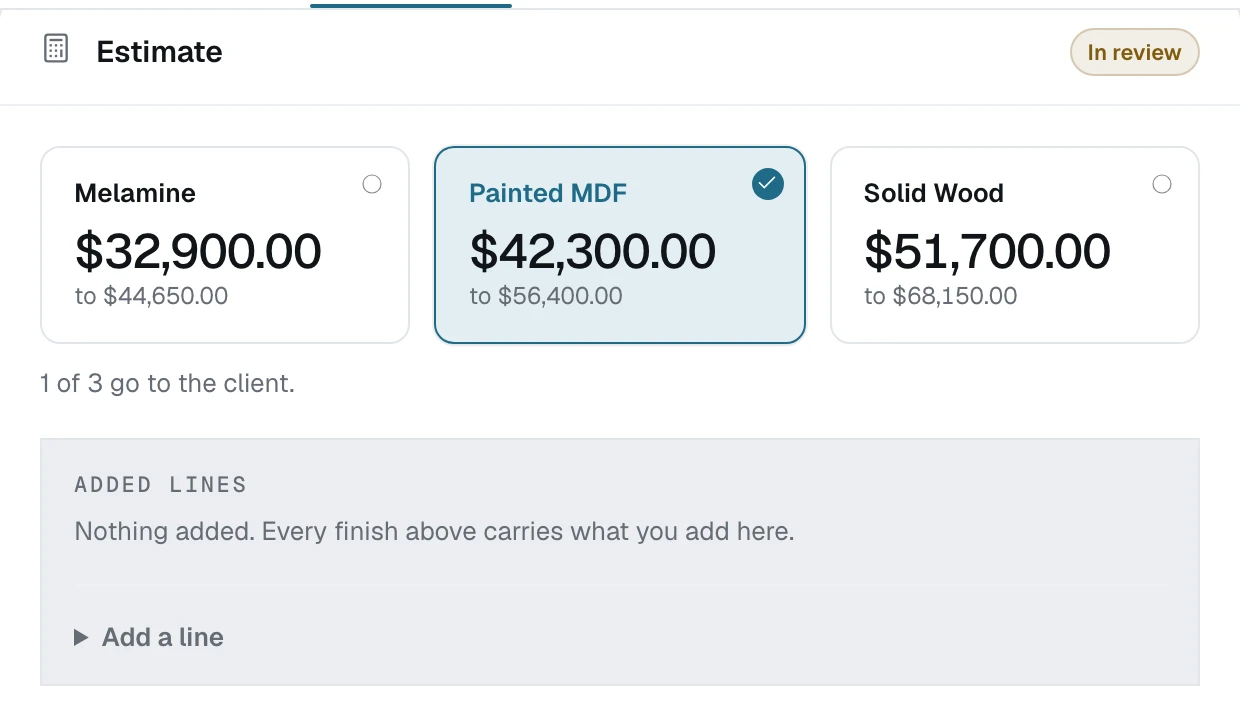
Decide by the job, not by the client's budget
Send one when the conversation has already settled the material. Send two when the client is deciding between them and the money is the deciding factor. Send all three when they have not told you enough to narrow it.
Whichever you tick, the client sees them as parallel ranges with nothing recommending one. That is the part worth keeping: a recommended option is a negotiation, and a set of options is a decision.
Know why there is no fourth control
There is no box to edit a family's figure, and there is not going to be one. The range is two of your own rungs. A figure you can nudge is a figure you will talk yourself down from between reading it and sending it, and that is the hour and a half this card exists to take back.
What you can do is add a line, which is money on top rather than money off. See Add a line and a note.
Tick at least one
Approve & create link stays disabled while nothing is ticked. An estimate with no finishes on it is a letterhead with a date, so the product refuses it rather than sending one.
What happens next
Add anything the rungs do not cover: Add a line and a note.